



What’s New in May: Compliance, Automation, and Calendar Control
As the vacation rental landscape continues to evolve, so does GuestWisely. This month, we’re rolling out powerful new features to support compliance, automate guest interactions, and enhance your calendar logic across complex property setups.
From smarter invoicing to auto-generated guest reviews and new payment insights, here’s everything that’s new in May.
Progressive Invoice Numbering: Built for Compliance
Governments—especially across Europe—are tightening invoicing regulations, requiring strict adherence to traceability standards. In response, we’ve introduced a Progressive Invoice Numbering system to help property managers stay compliant and audit-ready.

Once activated, this feature ensures that:
- Every invoice, receipt, and credit note follows a strict, gap-free sequential numbering pattern.
- Adjustments like cancellations or modifications are automatically accounted for without breaking your invoice chain.
- You stay aligned with local accounting and tax regulations.
To learn more or enable it, visit the Invoice Template Settings or view the full documentation here.
Reconciliation Report: Bringing Smarter Payment Tracking

We are introducing a new tool in the Payment Manager to help you verify and monitor financial activity across all properties: the Reconciliation Report.
Designed to help you match internal records with your bank statements more easily, this new report lets you:
- Filter and view payments across multiple properties by day, week, or custom ranges.
- Track invoice and receipt numbers in sequential order.
- Identify outstanding payments or discrepancies at a glance.
This is especially useful at month-end when reconciling transactions with your bank statements—giving you a clearer picture of income, deposits, and outstanding payments. You can read more about it here.
The Vrbo Guest Review Automation is Live
Managing reviews manually is a thing of the past. Starting today, we’re rolling out a feature to help you manage Vrbo guest reviews. You can now save time and standardize your post-stay follow-ups with ease.
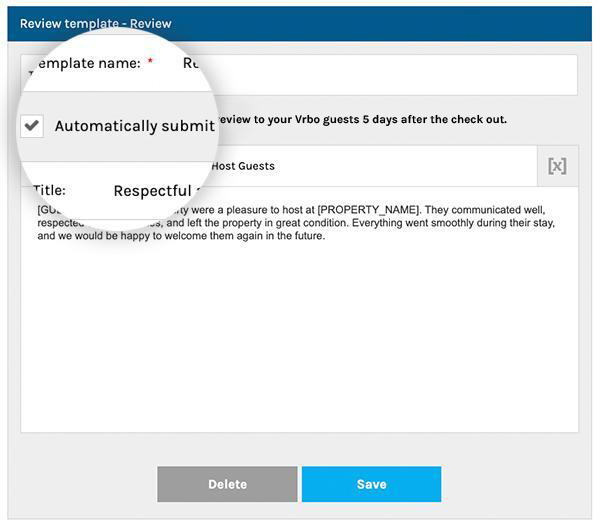
By default, the system will:
- Submit guest reviews five days after checkout automatically.
- Include a 5-star rating and “Recommended Guest” note.
This feature will be enabled by default, so we encourage you to review your settings now and make any changes as needed.
You can customize or disable this automation in: Booking Solutions > Guest Reviews > Response Templates.
If you prefer to handle reviews manually for specific bookings, you can disable automation for that reservation directly in the booking editor.
Bonus Tip: Pair this automation with our automated messaging tools to provide a seamless guest journey from booking to departure
Coming in June: Linked Property Calendar Sync
If you manage units with complex relationships—like duplexes, subdivided properties, or listings optimized for different traveler types—calendar accuracy is essential. That’s why we’re preparing to launch the Linked Property Calendar Sync, a feature that eliminates accidental double bookings.
Here’s what it will cover:
- Parent–Child Property Sync: If you have a setup where one property is linked to another (e.g., a duplex listed as a full unit and as individual apartments), a booking in one unit will automatically block the related unit’s availability. This ensures there’s no accidental overlap.
- Sister Listing Sync: For properties duplicated across channels to target different segments (e.g., pricing tiers or bedroom counts), availability will auto-sync across versions. A booking on one listing will instantly block the twin listing as well.
This is part of our broader push to enhance channel management and availability control in dynamic property setups.
More to Come…
From improved financial controls to smarter automation and industry recognition, May was a busy month at GuestWisely—and we’re just getting started. Stay tuned for a major calendar logic update and new partner integrations coming in June.
In the meantime, be sure to check out our Product Information hub for the full knowledge base.
Have questions or feedback? We’re all ears. Contact our team or connect with us on LinkedIn.


